
LIC ADO 2026-27: Registration Process
LIC ADO 2026-27: Registration Process
Check the complete LIC ADO 2026-27 Registration Process including step-by-step online application procedure, registration dates, application fee, required documents, photograph and signature upload guidelines, handwritten declaration format, document size specifications, important instructions, and expert tips to successfully apply for the LIC Apprentice Development Officer examination.
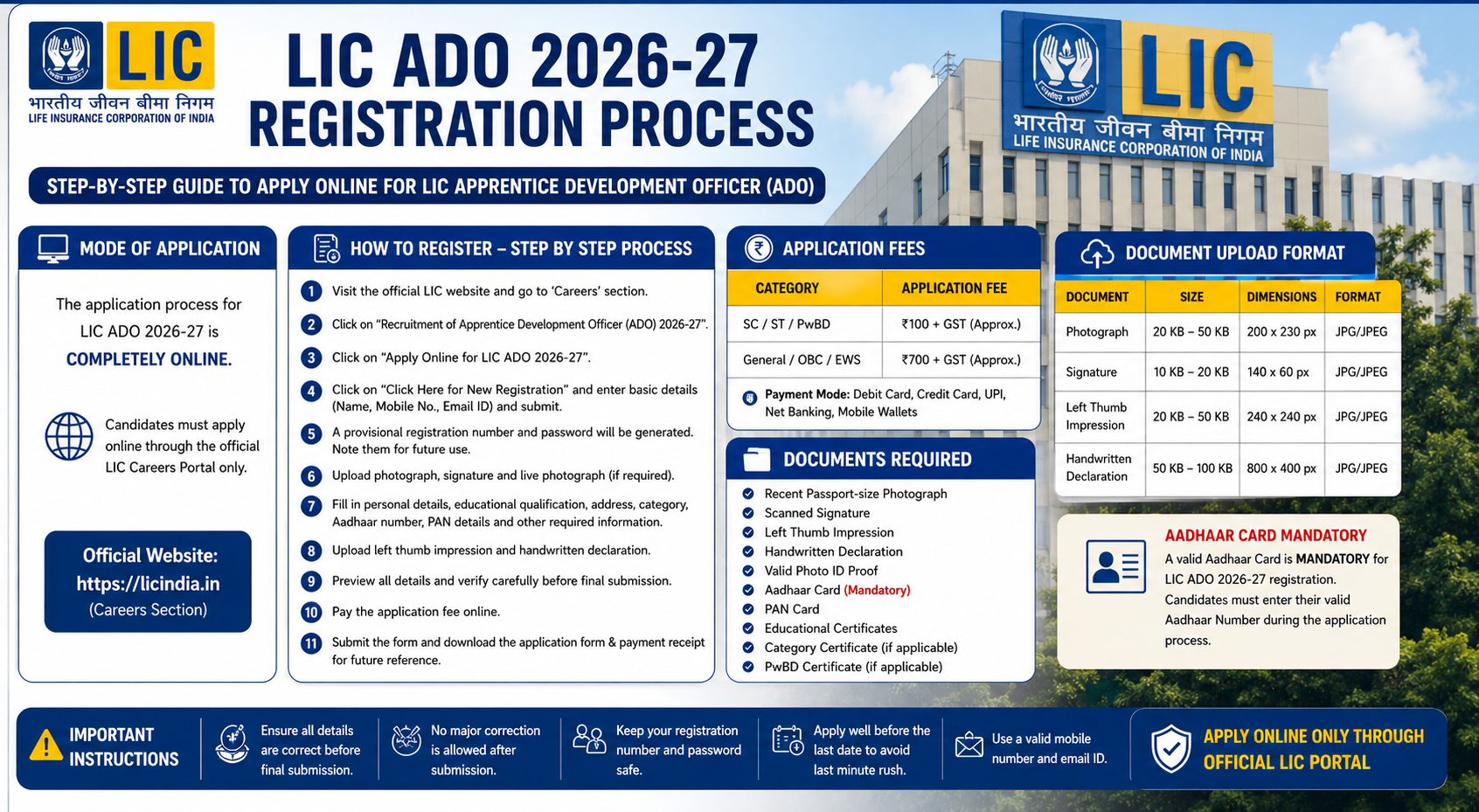
LIC ADO Registration 2026-27 – Steps to Apply Online, Application Fee & Required Documents
The Life Insurance Corporation of India is expected to begin the LIC Apprentice Development Officer (ADO) Registration 2026-27 process soon after releasing the official notification on the LIC careers portal. Candidates aspiring to join LIC as Apprentice Development Officers (ADO) must complete the online application process carefully within the prescribed dates.
The LIC ADO online registration process is completely digital and requires candidates to:
- Fill personal & educational details
- Upload required documents
- Pay the application fee
- Select exam centers
- Submit the final application form successfully
Candidates must carefully understand:
- Application process
- Registration dates
- Required documents
- Fee structure
- Important instructions
before applying online for LIC ADO 2026-27.
Official Website
Candidates should regularly visit the official LIC careers portal for:
- Notification updates
- Admit cards
- Exam dates
- Result announcements
- Official notices
LIC ADO Registration 2026-27 Overview
Particulars | Details |
|---|---|
Exam Name | LIC ADO Exam 2026-27 |
Conducting Authority | Life Insurance Corporation of India |
Post Name | Apprentice Development Officer (ADO) |
Application Mode | Online |
Official Website | LIC Careers Portal |
Registration Status | To Be Released |
Expected Notification Date | 2026 (Tentative) |
Selection Process | Prelims, Mains & Interview |
Important Dates for LIC ADO Registration 2026-27
Event | Expected Dates |
|---|---|
LIC ADO Notification Release | 2026 (Tentative) |
Online Registration Start Date | Along with Notification |
Last Date to Apply Online | 20–25 Days After Notification |
Last Date for Fee Payment | To Be Announced |
Prelims Admit Card Release | To Be Announced |
LIC ADO Prelims Exam | Tentatively After Registration |
Candidates are advised to complete the registration process well before the last date to avoid:
- Server issues
- Payment failures
- Heavy website traffic
Documents Required for LIC ADO Apply Online 2026-27
Before starting the online application process, candidates should keep the following documents ready in scanned format.
Required Documents
- Recent passport-size photograph
- Scanned signature
- Left thumb impression
- Handwritten declaration
- Valid photo ID proof
- Aadhaar Card details
- PAN Card details
- Educational certificates
- Category certificate (if applicable)
- PwBD certificate (if applicable)
LIC ADO Document Size & Format Guidelines
Document | File Size | Dimensions | Format |
|---|---|---|---|
Photograph | 20 KB – 50 KB | 200 × 230 pixels | JPG/JPEG |
Signature | 10 KB – 20 KB | 140 × 60 pixels | JPG/JPEG |
Left Thumb Impression | 20 KB – 50 KB | 240 × 240 pixels | JPG/JPEG |
Handwritten Declaration | 50 KB – 100 KB | 800 × 400 pixels | JPG/JPEG |
Candidates must ensure that uploaded documents are:
- Clear
- Visible
- Properly cropped
- As per LIC specifications
How to Apply Online for LIC ADO 2026-27?
Candidates can follow the detailed step-by-step registration process below.
Step 1: Visit Official LIC Website
Visit the official LIC careers portal and open the recruitment section.
Step 2: Open LIC ADO Recruitment Notification
Click on:
- “Careers”
- “Recruitment of Apprentice Development Officer (ADO) 2026-27”
Carefully read the official notification before applying.
Step 3: Click on Apply Online
Select:
“Apply Online for LIC ADO 2026-27”
Candidates will be redirected to the online application portal.
Step 4: Complete New Registration
Click on:
“Click Here for New Registration”
Now enter:
- Full Name
- Mobile Number
- Email ID
- Captcha Code
After entering details, click:
“Save & Next”
A provisional registration number and password will be generated.
Candidates should save these credentials carefully.
Step 5: Upload Photograph & Signature
Upload:
- Passport-size photograph
- Signature
- Live photograph capture (if required)
Photograph Guidelines
- Recent color photograph
- White/light background
- Face clearly visible
- No sunglasses or caps
Signature Guidelines
- Use black ink on white paper
- Signature should not be in CAPITAL LETTERS
- Avoid blurred images
Step 6: Fill Personal Details
Candidates need to enter:
- Category
- Religion
- Nationality
- Aadhaar Number
- PAN Details
- Exam center preferences
- Address details
- Parent details
- Marital status
- Disability details (if applicable)
Step 7: Enter Educational Qualification Details
Fill information regarding:
- Graduation details
- Educational qualifications
- Work experience (if applicable)
- Languages known
Reserved category candidates may also opt for Pre-Examination Training (PET) if applicable.
Step 8: Preview Application Form
Before final submission:
- Verify all details carefully
- Check uploaded documents
- Ensure correct spellings
- Verify educational qualifications
Important Note
LIC generally does not provide an application correction window after final submission.
Step 9: Upload Left Thumb Impression & Handwritten Declaration
Candidates must upload:
- Left thumb impression
- Handwritten declaration
LIC ADO Handwritten Declaration Text
“I, ___________, hereby declare that all the information submitted by me in the application form is correct, true, and valid. I will present the supporting documents as and when required.”
Important Instructions
- Declaration must be handwritten in English
- Use black ink only
- Avoid CAPITAL LETTERS
Step 10: Pay LIC ADO Application Fee
Candidates can pay the application fee using:
- Debit Card
- Credit Card
- UPI
- Internet Banking
- Mobile Wallets
LIC ADO Application Fee 2026-27
Category | Application Fee |
|---|---|
SC/ST/PwBD | ₹100 – ₹150 (Expected) |
General/OBC/EWS | ₹700 – ₹850 (Expected) |
Bank transaction charges may be borne by the candidate.
Step 11: Submit & Print Application Form
After successful payment:
- Download the application form
- Save payment receipt
- Print final application form for future reference
Important Scanning Instructions for LIC ADO Application
Candidates should follow these guidelines while scanning documents.
Scanner Settings
- Resolution: 200 dpi or above
- True color mode
File Format
- JPG/JPEG only
Important Tips
- Crop images properly
- Ensure clear visibility
- Avoid smudged signatures
- Upload readable thumb impressions
Can Candidates Edit the LIC ADO Application Form After Submission?
Generally, no major corrections are allowed after final submission.
If any mistake occurs:
- Candidates may need to submit a fresh application
- Application fee may need to be paid again
- Only the latest successfully submitted application may be considered valid
Therefore, candidates should carefully verify all details before final submission.
What Happens in Case of Multiple LIC ADO Registrations?
If multiple application forms are submitted:
- LIC generally accepts only the latest successfully submitted application
- Earlier applications may be rejected
- Previously paid fees are usually non-refundable
Candidates should avoid multiple registrations unless absolutely necessary.
LIC ADO Registration 2026-27 Important Tips
- Apply early to avoid server issues
- Use active mobile number and email ID
- Keep documents scanned beforehand
- Verify spelling and educational details carefully
- Save registration number and password securely
- Use stable internet connection during fee payment
What After LIC ADO Registration?
After successful registration, candidates should immediately begin focused preparation for:
- Prelims Examination
- Mains Examination
- Interview Process