
RBI Assistant Registartion Process 2026-27
Complete RBI Assistant 2026-27 Registration Process, Online Application Steps, Fees & Required Documents Guide
Get complete details about the RBI Assistant 2026-27 registration process including online application steps, important dates, application fee, required documents, photo & signature guidelines, and official instructions for successful form submission.
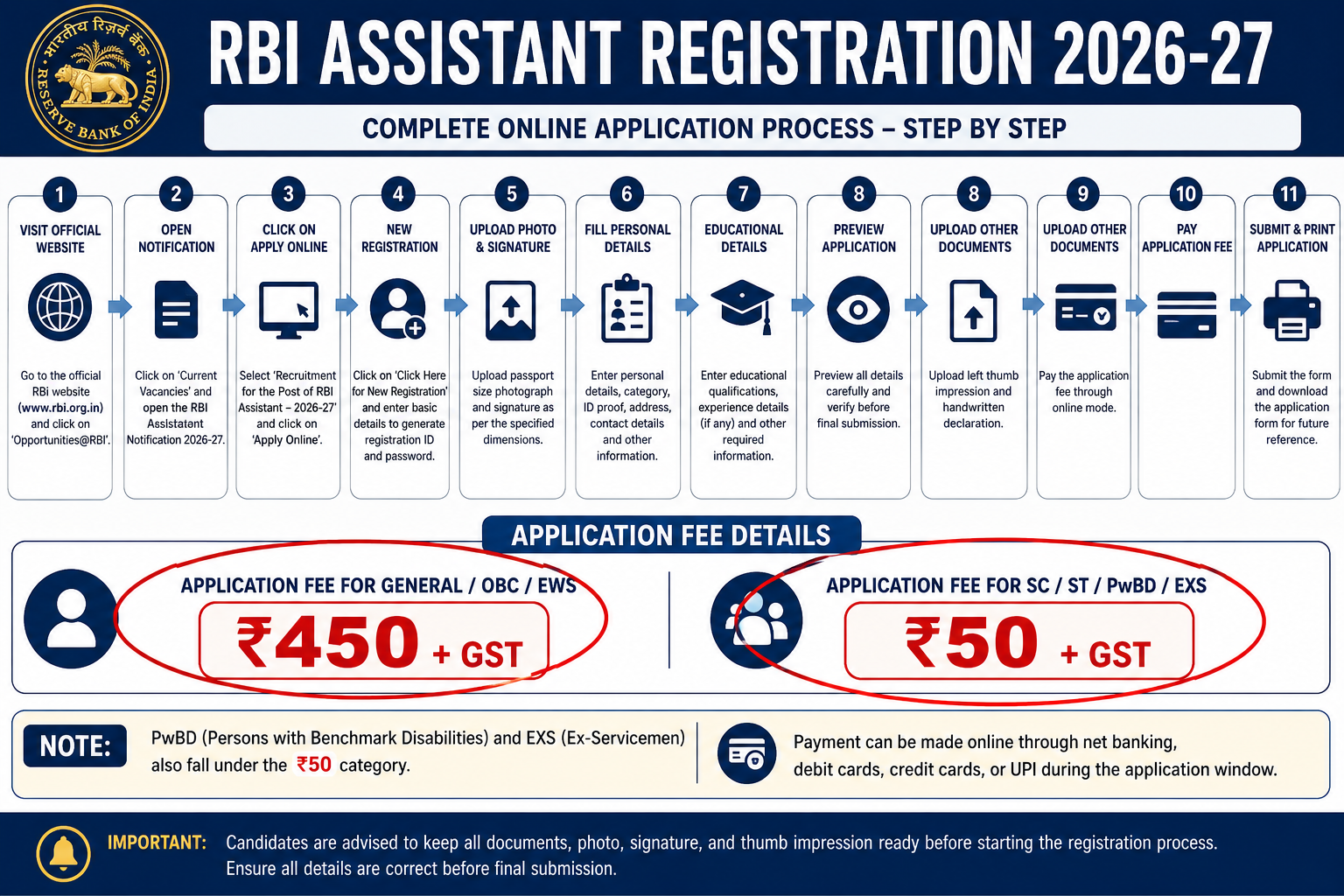
RBI Assistant Registration 2026-27: Steps to Apply Online, Application Fee & Required Documents
The Reserve Bank of India is expected to begin the RBI Assistant Registration 2026-27 process soon after releasing the official notification on the RBI official website. Candidates aspiring to join the Reserve Bank of India as Assistants must complete the online application process carefully within the prescribed dates.
The RBI Assistant online registration process is completely digital and requires candidates to:
- Fill personal & educational details
- Upload required documents
- Pay the application fee
- Select exam centers
- Submit the final application form successfully
Candidates must carefully understand the:
- Application process
- Registration dates
- Required documents
- Fee structure
- Important instructions
before applying online for RBI Assistant 2026-27.
Official RBI Website:
Reserve Bank of India
RBI Assistant Registration 2026-27 Overview
Particulars | Details |
|---|---|
Exam Name | RBI Assistant Exam 2026-27 |
Conducting Authority | Reserve Bank of India |
Post Name | Assistant |
Application Mode | Online |
Official Website | RBI Careers Page |
Registration Status | To Be Released |
Expected Notification Date | February–March 2027 |
Selection Process | Prelims, Mains & Language Proficiency Test |
Important Dates for RBI Assistant Registration 2026-27
Event | Expected Dates |
|---|---|
RBI Assistant Notification Release | February–March 2027 |
Online Registration Start Date | Along with Notification |
Last Date to Apply Online | 20–25 Days After Notification |
Last Date for Fee Payment | To Be Announced |
Prelims Admit Card Release | To Be Announced |
RBI Assistant Prelims Exam | April/May 2027 |
Candidates are advised to complete the registration process well before the last date to avoid server issues or payment failures.
Documents Required for RBI Assistant Apply Online 2026-27
Before starting the online application process, candidates should keep the following documents ready in scanned format.
Required Documents
- Recent passport-size photograph
- Scanned signature
- Left thumb impression
- Handwritten declaration
- Valid photo ID proof
- Aadhaar Card details
- PAN Card details
- Educational certificates
- Category certificate (if applicable)
- PwBD certificate (if applicable)
RBI Assistant Document Size & Format Guidelines
Document | File Size | Dimensions | Format |
|---|---|---|---|
Photograph | 20 KB – 50 KB | 200 × 230 pixels | JPG/JPEG |
Signature | 10 KB – 20 KB | 140 × 60 pixels | JPG/JPEG |
Left Thumb Impression | 20 KB – 50 KB | 240 × 240 pixels | JPG/JPEG |
Handwritten Declaration | 50 KB – 100 KB | 800 × 400 pixels | JPG/JPEG |
Candidates must ensure that uploaded documents are clear, visible, and according to RBI specifications.
How to Apply Online for RBI Assistant 2026-27?
Candidates can follow the detailed step-by-step registration process below.
Step 1: Visit Official RBI Website
Visit the official RBI website and open the “Opportunities@RBI” section.
Step 2: Open Recruitment Notification
Click on:
- “Current Vacancies”
- “Vacancies”
Open the RBI Assistant Recruitment 2026-27 notification.
Step 3: Click on Apply Online
Select:
“Recruitment for the Post of RBI Assistant – 2026-27”
Then click:
“Apply Online”
Candidates will be redirected to the IBPS online application portal.
Step 4: Complete New Registration
Click on:
“Click Here for New Registration”
Now enter:
- Full Name
- Mobile Number
- Email ID
- Captcha Code
After entering details, click:
“Save & Next”
A provisional registration number and password will be generated.
Step 5: Upload Photograph & Signature
Upload:
- Passport-size photograph
- Signature
- Live photograph capture (if required)
Photograph Guidelines
- Recent color photograph
- White/light background
- Face clearly visible
- No sunglasses or caps
Signature Guidelines
- Use black ink on white paper
- Signature should not be in CAPITAL LETTERS
- Avoid blurred images
Step 6: Fill Personal Details
Candidates need to enter:
- Category
- Religion
- Nationality
- Aadhaar Number
- PAN Details
- Exam center preferences
- Address details
- Parent details
- Marital status
- Disability details (if applicable)
Step 7: Enter Educational Qualification Details
Fill information regarding:
- Graduation details
- Educational qualifications
- Work experience (if applicable)
- Languages known
Reserved category candidates may also opt for Pre-Examination Training (PET) if applicable.
Step 8: Preview Application Form
Before final submission:
- Verify all details carefully
- Check uploaded documents
- Ensure correct spellings
- Verify educational qualifications
Important:
RBI generally does not provide an application correction window after final submission.
Step 9: Upload Left Thumb Impression & Handwritten Declaration
Candidates must upload:
- Left thumb impression
- Handwritten declaration
RBI Assistant Handwritten Declaration Text
Candidates should write the following declaration exactly as given:
“I, ___________, hereby declare that all the information submitted by me in the application form is correct, true, and valid. I will present the supporting documents as and when required.”
Important Instructions
- Declaration must be handwritten in English
- Use black ink only
- Avoid CAPITAL LETTERS
Step 10: Pay RBI Assistant Application Fee
Candidates can pay the application fee using:
- Debit Card
- Credit Card
- UPI
- Internet Banking
- Mobile Wallets
RBI Assistant Application Fee 2026-27
Category | Application Fee |
|---|---|
SC/ST/PwBD/EXS | ₹50 + GST |
General/OBC/EWS | ₹450 + GST |
Bank transaction charges will be borne by the candidate.
Step 11: Submit & Print Application Form
After successful payment:
- Download the application form
- Save payment receipt
- Print final application form for future reference
Important Scanning Instructions for RBI Assistant Application
Candidates should follow these guidelines while scanning documents.
Scanner Settings
- Resolution: 200 dpi or above
- True color mode
File Format
- JPG/JPEG only
Important Tips
- Crop images properly
- Ensure clear visibility
- Avoid smudged signatures
- Upload readable thumb impressions
Can Candidates Edit the RBI Assistant Application Form After Submission?
No.
Once the application form is finally submitted, candidates generally cannot edit or modify their details.
If any mistake occurs:
- Candidates may need to submit a fresh application
- Application fee must be paid again
- Only the latest successfully submitted application may be considered valid
Therefore, candidates should carefully verify all details before final submission.
What Happens in Case of Multiple RBI Assistant Registrations?
If multiple application forms are submitted:
- RBI generally accepts only the latest successfully submitted application
- Earlier applications may be rejected
- Previously paid fees are usually non-refundable
Candidates should avoid multiple registrations unless absolutely necessary.
RBI Assistant Registration 2026-27 Important Tips
- Apply early to avoid server issues
- Use active mobile number and email ID
- Keep documents scanned beforehand
- Verify spelling and educational details carefully
- Save registration number and password securely
- Use stable internet connection during fee payment
What After RBI Assistant Registration?
After successful registration, candidates should immediately begin focused preparation for:
- Prelims Examination
- Mains Examination
- Language Proficiency Test (LPT)
Candidates should regularly check the official RBI website for:
- Admit card release
- Exam dates
- Result announcements
- Official notices