
NABARD Grade A 2026-27: Registarion Process
Complete NABARD Grade A 2026 Registration Process, Application Steps & Important Guidelines.
Stay updated with the complete NABARD Grade A Registration 2026 process including important dates, application steps, required documents, fees, and official guidelines to apply online successfully for the Assistant Manager exam.
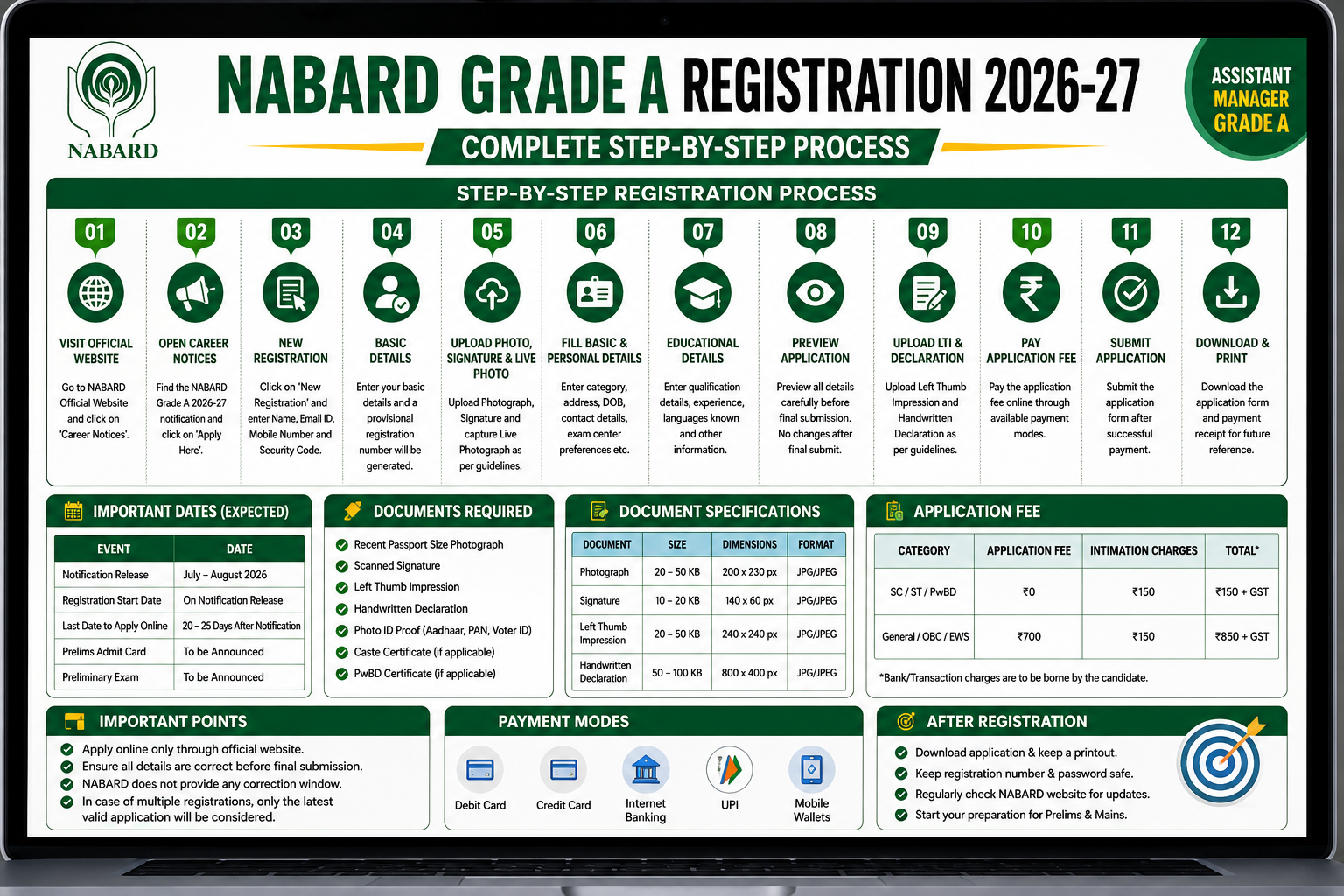
NABARD Grade A Registration 2026: Steps to Apply Online, Application Fee & Required Documents
The National Bank for Agriculture and Rural Development Grade A Registration 2026 process is expected to begin soon after the release of the official notification. Candidates planning to appear for the NABARD Grade A Assistant Manager Exam 2026 must understand the complete application process, required documents, registration dates, application fees, and important instructions before applying online.
A small mistake in the application form can lead to rejection. Therefore, candidates are advised to carefully read all instructions and keep their documents ready before starting the NABARD Grade A online registration process.
NABARD Grade A Registration 2026 Overview
Particulars | Details |
|---|---|
Exam Name | NABARD Grade A Exam 2026 |
Conducting Authority | National Bank for Agriculture and Rural Development |
Post Name | Assistant Manager Grade A |
Application Mode | Online |
Official Website | NABARD Official Website |
Registration Status | To Be Released |
Expected Notification Date | July–August 2026 |
Selection Process | Prelims, Mains & Interview |
Important Dates for NABARD Grade A Registration 2026
Event | Expected Dates |
|---|---|
NABARD Grade A Notification Release | July–August 2026 |
Online Registration Start Date | Along with Notification |
Last Date to Apply Online | 20–25 Days After Notification |
Last Date for Fee Payment | To Be Announced |
Prelims Admit Card | To Be Announced |
NABARD Grade A Prelims Exam | To Be Announced |
Candidates are advised to complete the registration process well before the last date to avoid server issues or payment failures.
Documents Required for NABARD Grade A Online Application 2026
Before starting the NABARD Grade A Apply Online process, candidates should keep the following documents ready in scanned format.
Required Documents
- Recent passport-size photograph
- Scanned signature
- Left thumb impression
- Handwritten declaration
- Valid photo ID proof
- Aadhaar card details
- PAN card details
- Category certificate (if applicable)
- PwBD certificate (if applicable)
NABARD Grade A Document Size & Format Guidelines
Document | File Size | Dimensions | Format |
|---|---|---|---|
Photograph | 20 KB – 50 KB | 200 × 230 pixels | JPG/JPEG |
Signature | 10 KB – 20 KB | 140 × 60 pixels | JPG/JPEG |
Left Thumb Impression | 20 KB – 50 KB | 240 × 240 pixels | JPG/JPEG |
Handwritten Declaration | 50 KB – 100 KB | 800 × 400 pixels | JPG/JPEG |
Candidates must ensure that all documents are clear, readable, and uploaded according to NABARD specifications.
How to Apply Online for NABARD Grade A 2026?
Candidates can follow the step-by-step process below to complete the NABARD Grade A Registration 2026 successfully.
Step 1: Visit the Official NABARD Website
Go to the official website of National Bank for Agriculture and Rural Development and open the Careers section.
Step 2: Open Career Notices
- Click on “Career Notices”
- Scroll to the latest recruitment section
- Open the NABARD Grade A Recruitment Notification 2026
Step 3: Click on Apply Online
Select:
“Recruitment to the Post of Assistant Manager in Grade ‘A’ – 2026”
Then click on:
“Apply Here”
You will be redirected to the IBPS application portal.
Step 4: Complete New Registration
Click on:
“Click Here for New Registration”
Now enter:
- Full Name
- Mobile Number
- Email ID
- Captcha Code
After entering details, click on:
“Save & Next”
A provisional registration number and password will be generated.
Step 5: Upload Photograph & Signature
Upload:
- Passport-size photo
- Signature
- Live photograph capture
Photograph Guidelines
- Recent color photo
- White/light background
- Face clearly visible
- No dark glasses or caps
Signature Guidelines
- Use black ink on white paper
- Signature should not be in CAPITAL LETTERS
- Avoid blurred images
Step 6: Fill Basic & Personal Details
Candidates need to enter:
- Category
- Religion
- Nationality
- Aadhaar Number
- PAN Details
- Exam center preferences
- Disability details (if applicable)
- Address details
- Parent details
- Marital status
Step 7: Enter Educational Qualification Details
Fill details regarding:
- Graduation
- Post Graduation
- Diploma
- Certifications
- Work Experience
- Languages Known
Candidates belonging to reserved categories may also opt for Pre-Recruitment Training (PRT).
Step 8: Preview Application Form
Before final submission:
- Verify all details carefully
- Check uploaded documents
- Ensure spelling accuracy
Important:
NABARD does not provide a correction window after final submission.
Step 9: Upload Left Thumb Impression & Handwritten Declaration
Handwritten Declaration Text
Candidates must write the following declaration exactly as given:
“I, ___________, hereby declare that all the information submitted by me in the application form is correct, true, and valid. I will present the supporting documents as and when required.”
Important Instructions
- Declaration must be handwritten in English
- Use black ink only
- Do not write in CAPITAL LETTERS
Step 10: Pay NABARD Grade A Application Fee
Candidates can pay the application fee through:
- Debit Card
- Credit Card
- UPI
- Internet Banking
- Mobile Wallets
NABARD Grade A Application Fee 2026
Category | Application Fee | Intimation Charges | Total |
|---|---|---|---|
SC/ST/PwBD | Nil | ₹150 | ₹150 + GST |
General/OBC/EWS | ₹700 | ₹150 | ₹850 + GST |
Bank transaction charges will be borne by the candidate.
Step 11: Submit & Print Application Form
After successful payment:
- Download the application form
- Save payment receipt
- Print the final application for future reference
Important Scanning Instructions for NABARD Grade A Application
Candidates should follow these guidelines while scanning documents:
Scanner Settings
- Resolution: 200 dpi or above
- True color mode
File Format
- JPG/JPEG only
Important Tips
- Crop images properly
- Ensure clear visibility
- Avoid smudged signatures or thumb impressions
Can You Edit the NABARD Grade A Application Form After Submission?
No.
Once the NABARD Grade A application form is submitted finally, candidates cannot edit or modify their details.
If any mistake is made:
- Candidates must submit a fresh application
- Pay the fee again
- Only the latest successfully submitted application will be considered valid
What Happens in Case of Multiple NABARD Grade A Registrations?
If a candidate submits multiple application forms:
- NABARD accepts only the latest successfully submitted application
- Earlier applications will be rejected
- Fee paid for earlier applications is generally non-refundable
Therefore, candidates should carefully verify details before final submission.
NABARD Grade A Registration 2026: Important Tips
- Apply early to avoid last-minute server issues
- Use an active email ID and mobile number
- Keep scanned documents ready beforehand
- Verify all spellings and details carefully
- Save registration number and password safely
What After NABARD Grade A Registration?
After completing the registration process, candidates should begin focused preparation for:
- Phase 1 (Prelims)
- Phase 2 (Mains)
- Interview
Candidates are advised to regularly check the official NABARD website for:
- Admit card updates
- Exam dates
- Result announcements
- Official notifications